Scanning Engines
AllyProof uses three engines in parallel to maximize detection. The primary engine (axe-core) has a zero false-positive policy. Together they produce deterministic violations for the failure patterns their rules cover, plus a dedicated advisory track for WCAG criteria that can only be partially automated and need human review. None of this establishes conformance — see WCAG Coverage for which criteria each layer can and cannot speak to.
Engine Pipeline
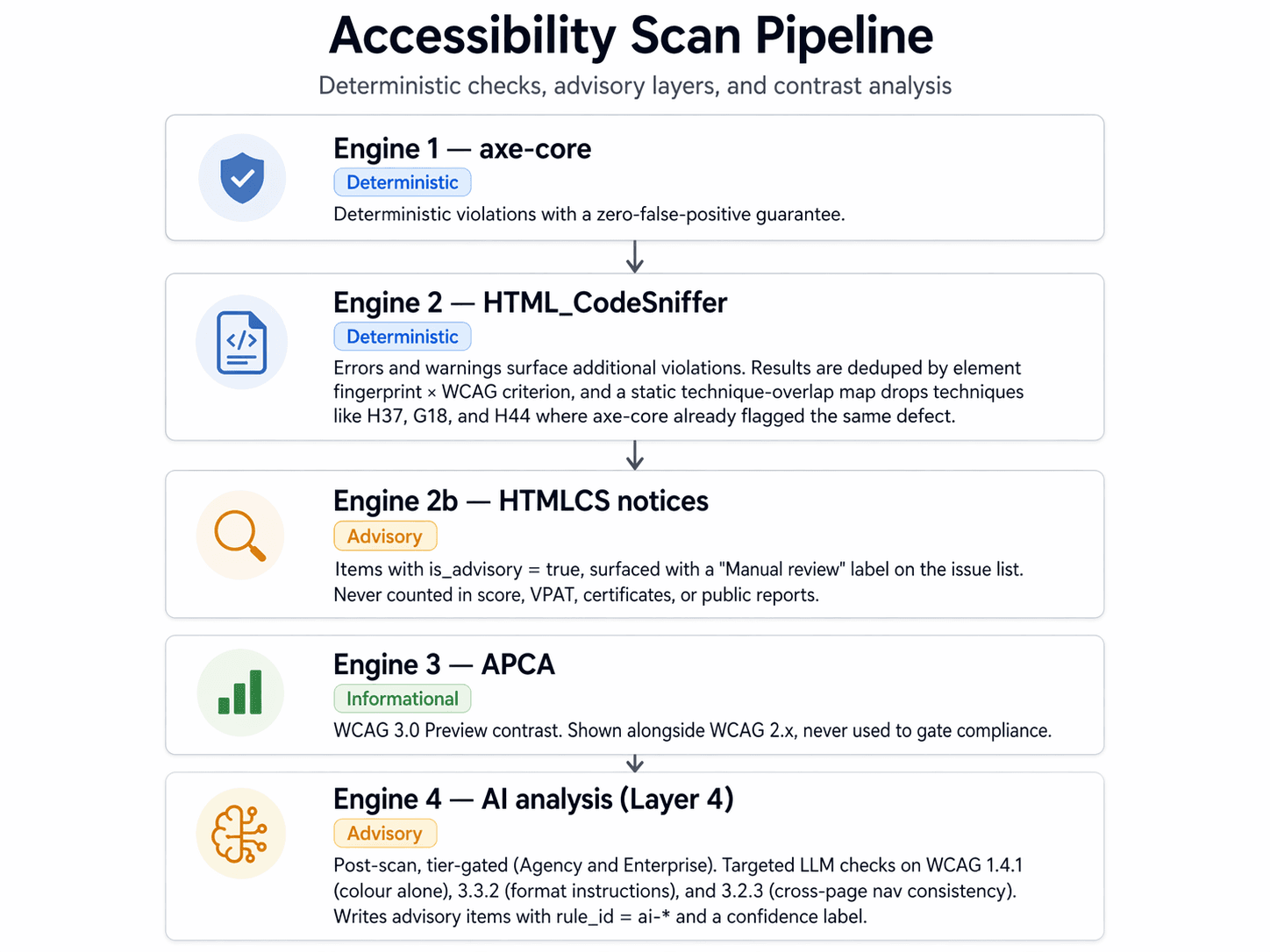
Accessibility Analysis Pipeline: a layered scan architecture that produces deterministic, advisory, preview, and AI-assisted outputs. Engine 1, axe-core, produces deterministic violations with manual-review results kept separate — this is the primary engine. Engine 2, HTML_CodeSniffer, produces additional violations from errors and warnings. Results are deduped by element fingerprint combined with WCAG criterion, and a static technique-overlap map drops techniques like H37, G18, and H44 where axe-core already flagged the same defect. Engine 2b, HTMLCS notices, are advisory manual-review items with is_advisory set to true. They're surfaced with a Manual review label and are never counted in the score, VPAT, certificates, or public reports. Engine 3, APCA, is a WCAG 3.0 Preview contrast check — informational only, shown alongside WCAG 2.x but never used to gate compliance. Engine 4, AI analysis, runs post-scan, is tier-gated to Business and Enterprise, and fires asynchronously on Layer 4. It targets criteria that need human judgement: WCAG 1.4.1 colour-only, 3.3.2 format instructions, and 3.2.3 cross-page navigation consistency. It writes advisory items with rule_id prefixed ai-, each confidence-labeled. Deterministic findings from Engines 1 and 2 feed the core score. Advisory and preview layers are surfaced separately.
Read pipeline as structured text
- Engine 1 — axe-coreDeterministic
Rule-based accessibility findings. Uncertain results require manual review.
- Engine 2 — HTML_CodeSnifferDeterministic
Errors and warnings surface additional violations. Results are deduped by element fingerprint × WCAG criterion, and a static technique-overlap map drops techniques like
H37,G18, andH44where axe-core already flagged the same defect. - Engine 2b — HTMLCS noticesAdvisory
Items with
is_advisory = true, surfaced with a “Manual review” label on the issue list. Never counted in score, VPAT, certificates, or public reports. - Engine 3 — APCAInformational
WCAG 3.0 Preview contrast. Shown alongside WCAG 2.x, never used to gate compliance.
- Engine 4 — AI analysis (Layer 4)Advisory
Post-scan, tier-gated (Business and Enterprise). Targeted LLM checks on WCAG 1.4.1 (colour alone), 3.3.2 (format instructions), and 3.2.3 (cross-page nav consistency). Writes advisory items with
rule_id = ai-*and a confidence label.
Why four tracks, not one combined list
- Rule-based findings (axe and included HTMLCS results) feed scores and reports. Review the recorded evidence and applicable rule; software defects, page state, and limited context can affect any automated result. These findings do not certify conformance.
- Advisory items (HTMLCS notices) are manual-review prompts for WCAG criteria neither engine can fully automate —
1.4.1(color alone),3.3.2(form instructions),2.1.1/2.4.7(focus behavior on modals, carousels),1.2.x(media alternatives). These used to be discarded; keeping them recovers most of the manual-review gap at no runtime cost. - APCA is an informational preview of the WCAG 3.0 contrast algorithm — shown alongside WCAG 2.x results, never used to gate compliance.
- AI analysis (Layer 4) runs three targeted LLM checks on criteria where judgment matters more than rule matching. Business and Enterprise tiers only. Findings are advisory, confidence-labeled, and never affect scores or legal reports.
Engine 1: axe-core (Primary)
| Property | Value |
|---|---|
| Source | Deque Systems (open source) |
| Rules | 91 active + 5 experimental |
| Standards | WCAG 2.0/2.1/2.2 A+AA, best-practice |
| False positives | Zero (strict policy) |
| Coverage | Failure detection for 91 rules; see WCAG Coverage for the per-criterion breakdown |
axe-core is the primary rules engine. Deque's policy aims to avoid false positives but explicitly acknowledges software bugs. Incomplete results require manual review; this policy is not a guarantee for AllyProof's combined pipeline.
Enabled experimental rules
css-orientation-lock— WCAG 1.3.4 Orientationlabel-content-name-mismatch— WCAG 2.5.3 Label in Namep-as-heading— WCAG 1.3.1 Info and Relationshipstable-fake-caption— WCAG 1.3.1 Info and Relationshipstd-has-header— WCAG 1.3.1 Info and Relationships
Engine 2: HTML_CodeSniffer (Secondary)
| Property | Value |
|---|---|
| Source | Squiz Labs (open source) |
| Rules | ~200 rules |
| Standards | WCAG 2.1 A, AA, AAA |
| Integration | Browser script injection |
| False positives | Low (errors), Medium (warnings) |
HTML_CodeSniffer uses different detection algorithms than axe-core, catching issues axe's strict zero-false-positive policy causes it to skip. Rule IDs are prefixed with htmlcs- for source identification.
How deduplication works
Dedup happens in two layers so we never double-count, and never silently drop a legitimate finding when the two engines disagree about the detail but agree about the element.
Layer 1 — per-(element, criterion) fingerprint. Each element's outerHTML is normalized (lowercase, collapse whitespace, strip comments, truncate) into a stable fingerprint. The dedup key is {fingerprint}|{wcag_criterion}. An HTMLCS finding is dropped only if axe reported the same element violating the same success criterion. If axe flags button-name on a button and HTMLCS flags contrast on the same button, both are kept — they are different issues.
Layer 2 — static technique-overlap map. A hard-coded set of HTMLCS technique codes (H37, G18, H44, F77, …) lists the cases where axe has a dedicated rule that covers the entire surface. Those HTMLCS findings are dropped regardless of fingerprint — a safety net against formatting differences. Conservative by design: when HTMLCS catches edge cases axe doesn't, the code stays out of the overlap list.
Message types → buckets
| HTMLCS type | Bucket | Flag | Counted? |
|---|---|---|---|
| Error (1) | Deterministic violation | impact=serious | Yes |
| Warning (2) | Deterministic violation | impact=moderate | Yes |
| Notice (3) | Advisory / manual review | is_advisory=true | No — surfaced inline with a Manual review pill |
Advisory items (HTMLCS notices)
Notices used to be discarded as "too verbose." That threw away exactly the signal needed for criteria neither engine can fully automate. Notices now persist as advisory items with is_advisory=true:
| Property | Advisory behavior |
|---|---|
| Counted in violation totals | No |
| Affects accessibility score | No |
| Appears in VPAT / certificates / public reports | No |
| Feeds AI fix suggestions | No |
| Surfaced in UI | Yes — inline on the issue list with a Manual review pill in place of the severity pill. Detail page opens to an amber callout explaining what manual review means. |
| Persisted across scans | Yes, with bucket-segregated resolve tracking |
| Counted separately | Yes — advisory_count on scan jobs and page scans |
Notices whose technique is in the axe-overlap map are dropped (no point in "please manually review alt text" when axe already checked every image). Everything else is kept.
Engine 3: APCA Contrast (Preview)
| Property | Value |
|---|---|
| Source | Myndex / W3C WCAG 3.0 draft |
| Type | Perceptual contrast calculator |
| Standard | WCAG 3.0 (draft) |
| False positives | None (mathematical) |
WCAG 3.0 replaces the WCAG 2.x contrast ratio formula with APCA (Advanced Perceptual Contrast Algorithm). APCA accounts for font size, weight, and perceptual uniformity, producing more accurate readability predictions.
APCA Lc thresholds
| Lc value | Use case |
|---|---|
| 90+ | Preferred for body text |
| 75 | Minimum for body text (16px regular) |
| 60 | Minimum for large/bold text |
| 45 | Minimum for non-text UI elements |
| 30 | Absolute minimum for any text |
Engine 4: AI Analysis (Layer 4 — Business + Enterprise)
| Property | Value |
|---|---|
| Runs | Async after the deterministic scan completes |
| Tier gate | Business and Enterprise only |
| Model | Per-tier selection by superadmin (Anthropic / Google / OpenAI) |
| Cost ceiling | ~40K tokens per scan, hard-capped |
| Output | Advisory items (is_advisory=true, rule_id prefix ai-) |
| Counts in scores / VPATs / certificates | No |
After Layers 1–3, roughly 30% of WCAG AA criteria are still inaccessible to static analysis. Most of those need judgment — "is the meaning of that red dot conveyed elsewhere?", "does this label tell the user to enter the date as MM/DD?", "is the nav the same on every page?" An LLM can reason over DOM + context in a way no rule engine can.
Layer 4 is deliberately narrow. It runs three targeted checks where the AI has the highest signal-to-noise ratio, not every possible WCAG criterion:
| Check | Criterion | What the AI decides |
|---|---|---|
| Color-only indicator | 1.4.1 Use of Color | Is color the sole cue, or is text / icon / shape also conveying meaning? |
| Missing format instructions | 3.3.2 Labels or Instructions | Does a format-requiring input (date, phone, code) communicate the expected format? |
| Nav consistency | 3.2.3 Consistent Navigation | Does the primary nav match across pages? (Only AI can do cross-page comparison.) |
How it works
- Snippet capture during the browser pass for each page: up to 3 navs, 20 form inputs (with labels + 300 chars of surrounding context + pattern/describedby flags), and 15 status-colored elements (filtered by computed color hue). Each region is size-capped and stored on
page_scans.ai_snippets. - Tier gate + model lookup. The orchestrator checks the org's plan against
aiScanAnalysisand reads the superadmin-configured model for the scan-analysis workload. - Page sampling. Up to 3 pages per scan — homepage always included when present, plus the pages with the most interesting snippet mass. Deterministic so reruns are cache-friendly.
- Batched LLM calls. Each check sends compact JSON payloads with a conservative system prompt. Findings are parsed defensively — malformed output is dropped rather than crashing the whole check.
- Upsert as advisory. Valid findings map into
violationswithis_advisory=true,rule_idprefixai-, and a confidence label. They appear inline on the issue list with the same Manual review pill as HTMLCS notices; the detail page opens to an amber callout explaining AI-sourced findings.
Conservative-output policy
- Color-only: must cite the absence of a specific redundant cue; err toward "unclear".
- Format instructions: free-form fields default to "no_format_required" — only confident misses are flagged.
- Nav consistency: low-confidence findings are discarded outright — cross-page diffs have high false-positive risk.
Model selection
Superadmin chooses the model per plan tier in the AI Scan Analysis panel, mirroring the AI Fix Suggestions panel. Typical setup: a cheaper Haiku-class model for scan analysis (runs frequently), a stronger model for fix suggestions (runs less often, deeper analysis). Available providers: Anthropic (Claude), Google (Gemini), OpenAI (GPT).
Coverage Comparison
| Engine / layer | Rules | Tier | Coverage contribution |
|---|---|---|---|
| axe-core | 91 | All | Deterministic failure detection (baseline) |
| HTML_CodeSniffer (errors & warnings) | ~200 | All | +10–15% deterministic |
| HTML_CodeSniffer (notices → advisory) | same 200 rule-set | All | Closes ~60% of the manual-review gap |
| APCA | 1 (contrast) | All | WCAG 3.0 preview |
| AI scan analysis (Layer 4) | 3 focused checks | Business + Enterprise | Covers 1.4.1 / 3.3.2 / 3.2.3 — the highest-impact criteria AI can judge reliably |
| Combined | ~290 + 3 AI | Tier-dependent | Deterministic failure detection + AI-flagged + HTMLCS-flagged manual-review items for what rules cannot decide |
Security wall around AI
The AI layer consumes HTML extracted from third-party sites. That HTML is untrusted — a malicious site could embed hidden text instructing the model to exfiltrate data, misclassify findings, or emit a response containing XSS. The LLM itself never has direct access to our environment variables or database; the real attack surface is (1) a poisoned response that misleads users, (2) stored XSS in rendered AI output, (3) reconnaissance probing for tools/prompts, (4) resource exhaustion via inflated output, and (5) hostile URLs in AI content.
Physical isolation — the ai-worker service
Every LLM call in production leaves the main app over HTTP to an isolated sibling service at services/ai-worker/. That service holds only the LLM provider keys and an HMAC shared secret. It has no Supabase client, no Paddle keys, no Resend keys, no R2 credentials, no file-system writes (container runs with --read-only and --cap-drop=ALL), no access to other services. It's bound to the internal Docker network and never exposed to the internet. Requests are HMAC-SHA256-signed with a 60-second replay window and a 1 MB body cap.
The main app calls the worker through a single chokepoint (src/lib/ai/worker-client.ts). Provider SDK imports are dynamic and gated by a dev-only fallback that is hard-blocked in production. A compromise of the LLM path — prompt injection, supply-chain, or anything else — therefore burns tokens but exposes no user data, no tenant secrets, no billing credentials.
Prompt-layer wall (defense in depth, inside both processes)
| Layer | Where | What it does |
|---|---|---|
| Input sanitizer | Main app | Strips <script>, <style>, <iframe>, event handlers, javascript:/vbscript:/data:text/html URIs, zero-width and bidi characters, HTML comments, data-* attributes, and known prompt-injection markers before any DOM snippet touches a prompt. Visually-hidden elements are emptied. |
| Prompt wrapper | Main app | All untrusted content sits between UNTRUSTED_START / UNTRUSTED_END markers with an explicit guardrail paragraph and a repeated reminder after the block. System prompts start with a shared safety preamble that separates trust levels and forbids the model from revealing its system prompt, tools, or environment. |
| Worker scrub | ai-worker | Last chance before a response crosses the boundary. Strips script/style/iframe/event-handler/dangerous-URI content from prose (preserves fenced code blocks), strips invisibles, caps response at 16 KB. |
| Output validator | Main app | Every response is parsed against a strict Zod schema. Free-form text is scrubbed (HTML tags removed, invisible chars stripped, length capped). URLs must resolve to http(s). Anything that fails validation is silently dropped. |
| UI escape | Main app | AI output is rendered via React text nodes and custom code highlighters — no dangerouslySetInnerHTML. Even if a scrub missed something, the browser receives escaped text. |
No single layer is a security boundary on its own. The value comes from combining a physical isolation perimeter with multiple prompt-layer trip wires. A poisoned response that survives the worker's scrub still has to pass the main app's Zod validation — and even if it did, it would only reach a process that doesn't hold the keys an attacker would want. maxTokens is capped per call and Layer 4 enforces a 40K token-per-scan budget that exits early when exhausted.
What stays manual even with Layer 4
Even with advisory items and AI analysis, these criteria remain out of reach of any static or async scanner — they need human testing or runtime probes:
- 2.3.1 Photosensitive flashing — requires frame-rate analysis (PEAT)
- 3.3.1 / 3.3.3 Error announcement timing — runtime only, requires assistive tech
- 1.2.3 / 1.2.5 Caption / audio description quality — presence yes, correctness no
- 2.1.1 / 2.4.3 Modal focus trap / return-focus — runtime behavior, needs Playwright interaction probes (future work, scriptable without LLM)